
In regulated engineering, the useful question about a tool update isn’t “what’s new.” It’s “what can I stop worrying about now.” July’s releases across Risksheet, Powersheet, Gantt, Planningboard, and Checklist each answer that question somewhere different — from calculations that keep working when nobody’s watching them, to plans you can build before you know who’s staffing them.
All Products — AI, Deliberately Kept Separate
We have explained before why we didn’t rush AI into our products. The answer hasn’t changed, but the architecture has become clearer, and it’s worth being precise about it.
The AI Assistant is not part of Risksheet or Powersheet. It ships as a separately installed Nextedy AI package with its own license. What shipped in the products this month is the integration layer that lets that package plug in: an admin-section slot and documentation-search routing so the Admin AI Assistant can help administrators configure a sheet, plus row-anchored action slots, conversation history, and sidebar layout so the Risksheet AI Assistant can be refined conversationally. You can now add follow-up context to a proposal — a constraint the Assistant didn’t know about, a standard it needs to respect — and re-run it with the accumulated conversation rather than starting over.
Powersheet now has the same Assistant, bringing the AI-driven authoring experience from Risksheet into traceability work.
Why insist on the separation? Because in a validated environment, “which version of what is installed, and under which license” is not a detail. Keeping the Assistant in its own package means the risk workspace and the AI that assists it can be adopted, licensed, and audited independently. Some customers will want both. Some will want the sheet and nothing else. Both are supported answers.
One consequence worth flagging: the Assistant’s entry point in the Risksheet sidebar now stays visible even when the Nextedy AI package isn’t licensed or has no configured actions — rendered disabled, with a tooltip explaining how to enable it. If you’d rather your users not see an entry point for something you haven’t bought, administrators can switch that visibility off through context properties.
Risksheet
The Calculations You Don’t Want to Look At
A risk sheet usually contains two kinds of columns: the ones the assessor fills in, and the ones the standard requires but nobody wants on screen. Severity, occurrence, and detection are the work. The intermediate factors feeding an RPN or an AP are bookkeeping.
The natural instinct is to hide the bookkeeping. Until now that broke the math, because formula columns were evaluated when their cells were drawn — hide the column and the calculation stopped happening.
Risksheet now calculates formula columns whether or not they’re visible. Formulas evaluate on load, on insert, and on edit. A calculated column and everything feeding it can stay hidden while dependent formulas and cell styling keep working, and correct values appear every time the sheet opens. Writable results are persisted to their mapped Polarion fields as items are created and edited — so the derived values read correctly in Polarion reports and queries too, not just inside the sheet.
The practical effect: you can finally build staged views that show an assessor exactly the columns they need, without quietly disabling the calculations that make the assessment valid.
Powersheet
Big Sheets, One Configuration
Requirements traceability matrices have an unpleasant scaling property. The interesting slice is small; the dataset behind it isn’t. Pull the full hierarchy to the browser and filter it there, and you’re fetching hundreds of thousands of rows to display a few hundred.
Two Powersheet changes attack this from opposite ends.
Subqueries per expand level let a sheet author attach a where clause to each level, loading only the relevant slice of nested data — hardware system requirements under domain-agnostic user needs, for example, instead of every child of every parent. Pickers on those levels respect the same subquery, so what you save is what you saw.
Parametrised queries driven by URL parameters solve the other half. Queries and subqueries can reference a URL parameter — ?component=HW — so one sheet configuration serves many slices. Change the parameter, get the matching view. No more maintaining a near-identical sheet per variant and hoping they stay in sync. A view parameter does the same for saved views, which makes a link to a specific view genuinely shareable.
One configuration, many slices, and the sheet stays responsive. That combination is what makes an RTM usable at enterprise scale rather than impressive in a demo.
Keeping Your Place
There’s a category of friction that never makes it into a requirements document because nobody can quite justify writing it down: the sheet jumps, you lose your row, you scroll back, you find your place, you continue. Thirty times an hour.
Powersheet spent this month on it. Sticky cells keep higher rows’ content visible until they fully scroll out of view, so context survives sheets that don’t fit on screen — on by default, switchable from the Menu. Beyond that, scroll position, row focus, and row heights are now preserved across the editing operations that used to disturb them: saving, unlinking a many-to-many child from a deeper level, unlinking the last child in an ungrouped sheet, deleting an unsaved child in a grouped sheet, toggling groups.
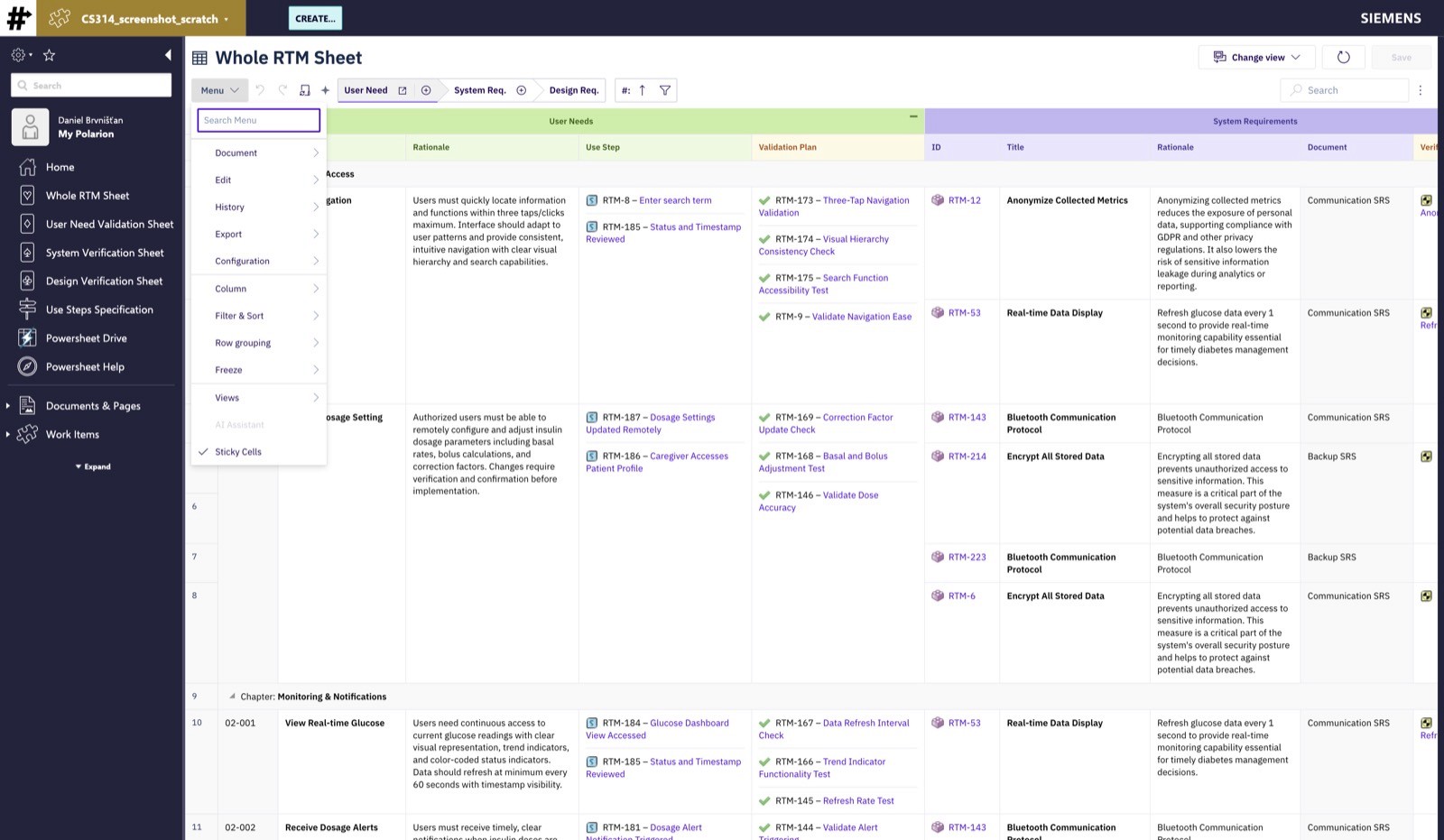
Two related cleanups: unsaved items can be deleted directly from the sheet without saving them first, and items created through the sheet but left unlinked are now discarded rather than saved as orphans. The second one matters more than it reads — the sheet’s save behavior now matches what the sheet shows you. If you can’t see it, it isn’t in your tracker.
Gantt
Planning Before You Know the Names
We previously described a prototype: you’re planning work six to twelve months out, you know your team capacity but not the individuals, and every planning tool insists on a name in the assignee field. We called it proof-of-concept work and said we’d shape it with customers.
Here’s where it went.
Preview: Gantt Team Assignments can now express capacity in absolute hours per day, not only as a percentage of someone’s calendar. That sounds like a small unit change. It isn’t — percentage-of-calendar assumes a calendar, which assumes a person. Absolute hours supports “pre-allocate this much capacity here,” which is how long-range plans are actually built.
Preview: Team Assignments can now be bound to roles and departments rather than individual users — a first step toward Resource Breakdown Structure support. You point a Work Item enum custom field at your RBS hierarchy, those resources carry capacity in absolute hours, and you sketch the plan against the roles you’ll need. People get attached later, when you know who they are.
Both are marked preview, and we mean it: the model is intentionally rough and will change based on what customers tell us. If long-range capacity planning against roles is a live problem in your organization, this is the moment your feedback shapes the result rather than working around it.
Planningboard
Boards Shaped Like Your Organization
Program planning rarely respects project boundaries. If the same release exists as a plan in six projects, a board that shows six columns for it is technically correct and practically useless.
Planningboard now merges columns across projects — plans sharing an ID become a single column, in both plan-based and enum-based views. And project swimlanes can be filtered with a query, so a board scoped to a group or the global repository shows the projects that matter to this conversation rather than all of them. Scope handling for project groups and the global repository was corrected in the same release.
Checklist
Audit Records That Actually Record
Checklist’s conditional state — the “not applicable, and here’s why” answer that compliance reviews depend on — had three ways of not being there when you needed it. Inside a LiveDoc it was reset to empty after saving or refreshing. On a read-only checklist it rendered as an empty checkbox to anyone without edit permissions, which is a materially different statement. And entries ending with a trailing space were duplicated.
All three are fixed. Conditional state is now persisted like every other checkbox state and renders correctly in read-only view.
We’re listing bug fixes under their own heading here rather than burying them, because a checklist that displays a different answer than the one the reviewer gave is not a cosmetic defect. It’s an audit record that says the wrong thing.
Small Fixes That Matter
The rest of this month’s fixes came directly from customer reports and real-world usage.
Gantt
Polarion banner height no longer shrinks the viewport and hides the horizontal scrollbar
Compare-with-date shows the initial red bar again
Milestone-mode time periods and edit-dialog end dates no longer shift by a day
Auto-schedule leaves completed read-only tasks where they are
Parent items with derived schedules aren’t flagged as modified when a child change doesn’t affect them
Expand/collapse state survives the toolbar buttons
The parent selector is now a searchable dropdown that stays inside the dialog instead of stretching past the browser chrome
Marker labels stay visible while scrolling instead of appearing only on hover
Powersheet
Type-level constraints respected on expanded items
Sheets pointing at a global sheet or model configuration load correctly
Prefixed outline-number columns no longer prevent loading
Transaction failures on save now name the actual cause — a missing link role or required field — instead of a generic 400
Risksheet
Sheet no longer breaks when a renderer is used without cellDecorators configured
Horizontal scrollbar visible when a custom widget sits in the top panel
Dependent enum behavior realigned with native Polarion after a regression
Referenced items appear in the item picker
Configuration Editor opens PDF Export scripts again
Also this month, two bundled third-party libraries were addressed following known security findings: one updated in Risksheet, one removed from Gantt because it was no longer in use. No functional impact in either case, but worth knowing they’re handled.
What’s Next
The role-based and absolute-hours capacity work in Gantt is the thread to watch. It’s preview for a reason — the shape of Resource Breakdown Structure support will be decided by the organizations that try it and tell us where it breaks. If your planning horizon is longer than your staffing certainty, we’d like to hear from you while the model is still soft.
On the AI side, the integration layers are in place across both sheets. What goes through them is the interesting part, and it’s still being validated with customers rather than announced.
Contact us if you want to look at role-based planning, the Nextedy AI package, or parametrised RTM sheets in your own environment.
Until next month — stay efficient, connected, and let’s keep pushing Polarion forward together. 🚀